For each lot, you can view the bidding history. This shows which bids have already been placed, when they were registered and the corresponding bid amount. This helps you follow the bidding activity on the lot.
On desktop
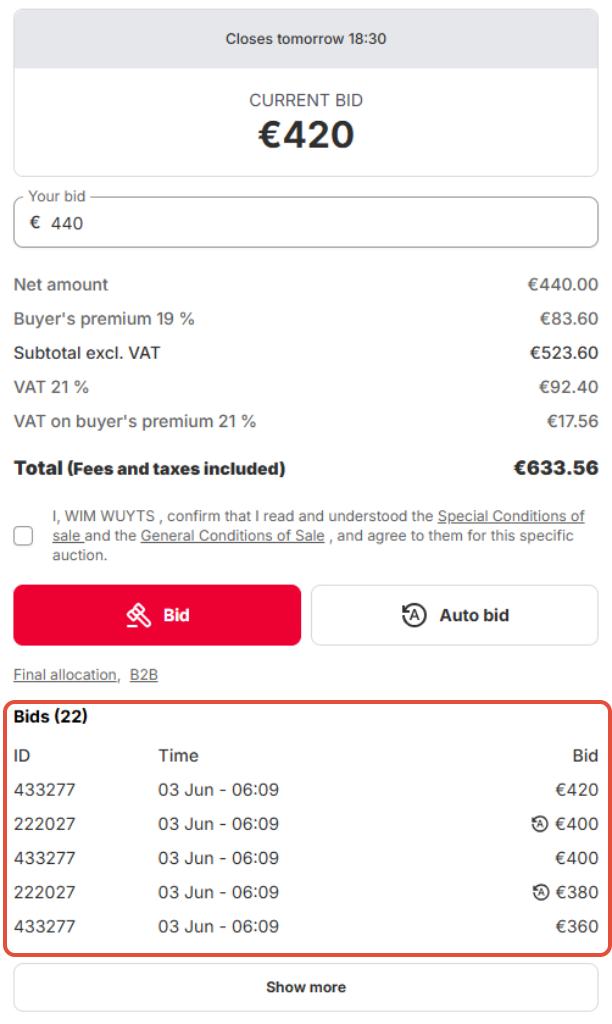
On the desktop version, you can find the bidding history on the lot detail page, below the bidding section.
Under the bidding buttons, you will see a link to Bids. This overview shows:
- the bidder number or bidder ID;
- the time at which the bid was placed;
- the bid amount;
- an icon if the bid was placed via automatic bidding.
What does the automatic bidding icon mean?
When you see an automatic bidding icon next to a bid, this means that the bid was placed automatically via automatic bidding. The bidder has set a maximum amount in advance. The system then continues to bid automatically, using the minimum bid increment, as long as the maximum amount is not exceeded.
Why do several bids sometimes appear shortly after each other?
This can happen when multiple bidders have set up automatic bidding. The system automatically compares the maximum amounts set by the bidders and places new bids according to the applicable bid increments. As a result, several bids can appear within a short period of time.
Was this article helpful?
That’s Great!
Thank you for your feedback
Sorry! We couldn't be helpful
Thank you for your feedback
Feedback sent
We appreciate your effort and will try to fix the article