What can I find in my account?
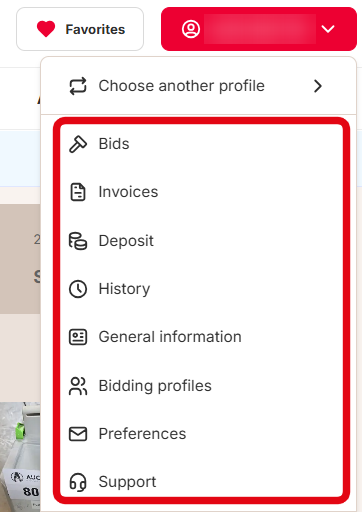
Click the red button with your name at the top right. There you find:
- Choose another profile: switch between your bidding profiles.
- Bids: your favourites and ongoing bids, with filters and a list or grid view.
- Invoices: pro formas, invoices, release notes and the payment status.
- Deposit: your deposit balance, the payments and the button to request your deposit back.
- History: all your bids with time, bid type and amount.
- General information: name, e-mail address, mobile number, password and language.
- Bidding profiles: your personal profile and your company profiles.
- Preferences: newsletters and reminder e-mails.
- Support tickets: your questions and complaints and our replies.
Bids, invoices, deposit and history always show the data of the active bidding profile. Its name is shown in brackets next to the title, for example "Deposit (COMPANY 1)".
Related: How do I switch bidding profiles? · How do I set my preferences?
Was this article helpful?
That’s Great!
Thank you for your feedback
Sorry! We couldn't be helpful
Thank you for your feedback
Feedback sent
We appreciate your effort and will try to fix the article