To make things easier for you, we do not automatically refund your deposit after an auction has ended. This allows you to continue bidding easily on other auctions without having to pay a new deposit each time.
If you decide not to bid anymore and would like to reclaim your deposit, you can easily arrange this yourself.
Refund procedure
1. Log in
Log in to auctim.com with your email address and password.
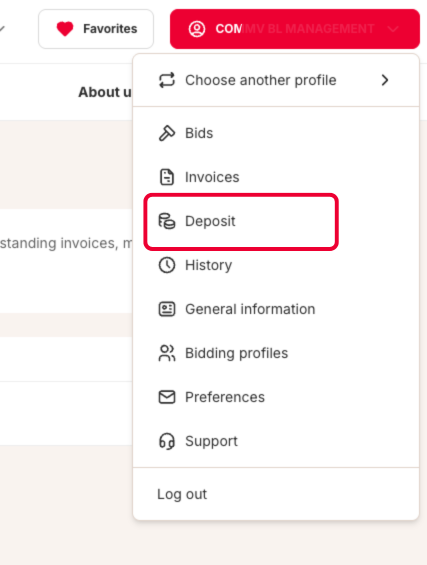
2. Go to your deposit
Click on your profile at the top of the page and select “Deposit” from the menu.
3. Request your refund
In the overview, you will see the available deposit amount. Click the button to start the refund process.
Important:
You can reclaim your deposit once all transactions have been fully completed. This means you no longer have any active highest bids or unpaid invoices, all won lots have been collected, and there are no ongoing questions or complaints.
As soon as these conditions are met, the refund procedure will be started. Your deposit will automatically be refunded after a few days. The exact processing time depends on your bank.
Was this article helpful?
That’s Great!
Thank you for your feedback
Sorry! We couldn't be helpful
Thank you for your feedback
Feedback sent
We appreciate your effort and will try to fix the article